QWERTY vs. Dvorak: Which Keyboard Layout Is Better?
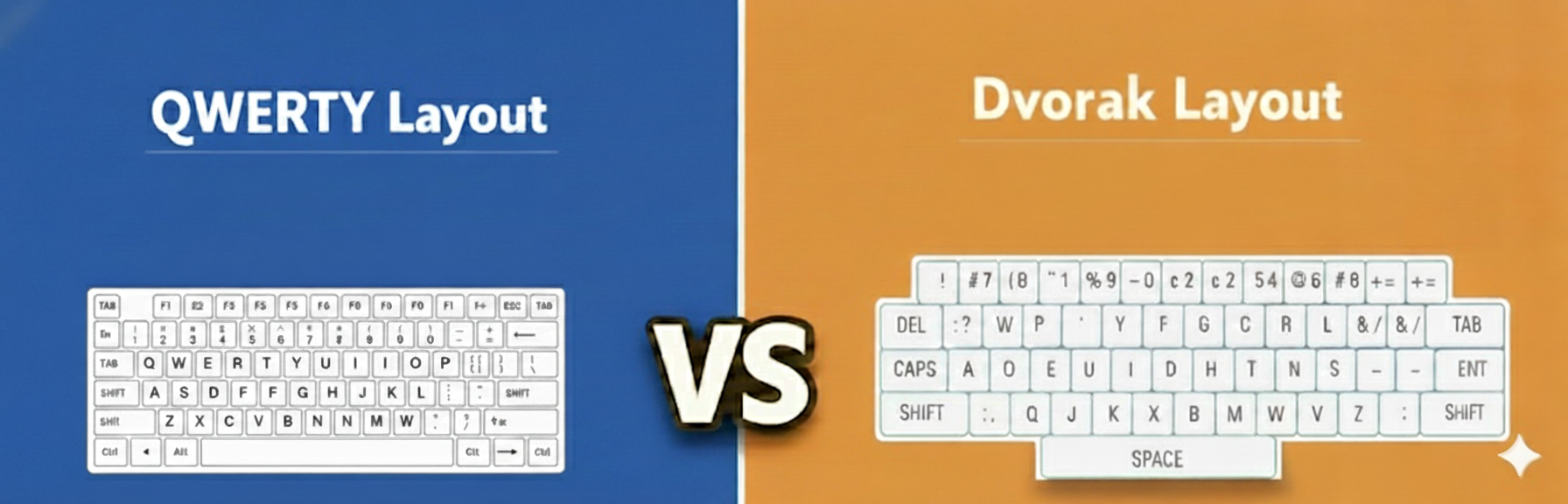
In 2026, we spend more time interacting with our keyboards than almost any other tool. Yet, most of us are still using a layout designed in 1873 to keep mechanical typewriter arms from jamming. While QWERTY remains the undisputed king of convenience, the Dvorak Simplified Keyboard has emerged as the ultimate ergonomic challenger for the modern professional.
Is it worth "re-wiring" your brain for a new layout, or should you stick with the tried-and-true standard? At Typers World, we’ve broken down the data to help you find your perfect match.
The Shared Foundation: What Stays the Same?
Switching layouts isn't as scary as it sounds. Both layouts share the same "DNA," which helps flatten the learning curve:
- Alphabet & Numbers: Both use the standard Latin alphabet and keep numbers (1-0) on the top row.
- Functional Keys: Your F-keys, Escape, and Arrow keys do not move.
- The Modifiers: Shift, Ctrl, Alt, and Command/Windows keys function exactly the same.
- No Hardware Required: You don’t need a new keyboard. Windows, macOS, Linux, iOS, and Android all allow you to switch to Dvorak for free in your software settings.
The Historical Champion: QWERTY
Created by Christopher Sholes, the QWERTY layout prioritizes mechanical reliability over human comfort.
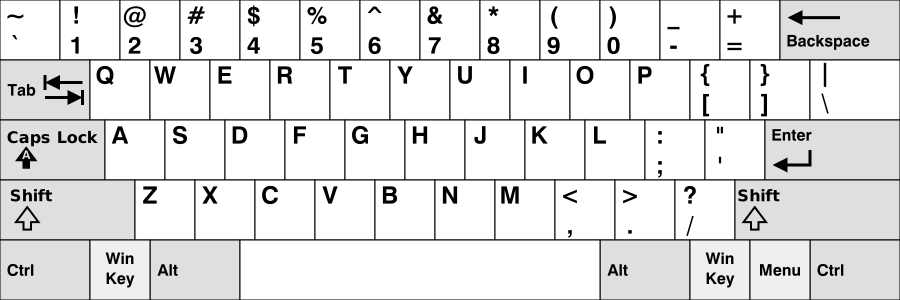
- Universal Compatibility: You can sit at any computer in the world and your muscle memory will work.
- Gaming Superiority: PC gaming is built around the "WASD" cluster. On Dvorak, these keys are scattered (becoming
,AOE), which makes gaming frustrating without custom remapping. - Shortcut Efficiency: Common shortcuts (
Ctrl+X,Ctrl+C,Ctrl+V) were designed for the left hand on a QWERTY board.
The Ergonomic Challenger: Dvorak
Patented by Dr. August Dvorak in 1936, this layout was designed for maximum human efficiency.
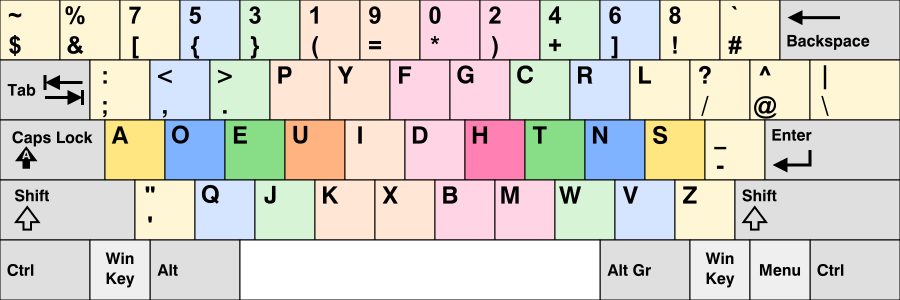
- Home Row Efficiency: On QWERTY, you only type 32% of words on the home row. On Dvorak, that jumps to 70%.
- Reduced "Finger Travel": In a workday, a QWERTY typist's fingers travel up to 20 miles. A Dvorak typist covers only 1 mile. This is a massive victory for wrist health.
- The "Mac" Secret: Apple users have a specialized layout called "Dvorak – QWERTY ⌘." This allows you to type in Dvorak but switches to QWERTY when you hold Command, keeping your shortcuts in place!
- The Coder’s Edge: For developers, Programmer Dvorak is a specialized variant that places symbols like
[ ],{ }, and/in easier-to-reach spots.
The "Heat Map" Comparison
If you visualize where a typist spends their time, the difference is night and day.
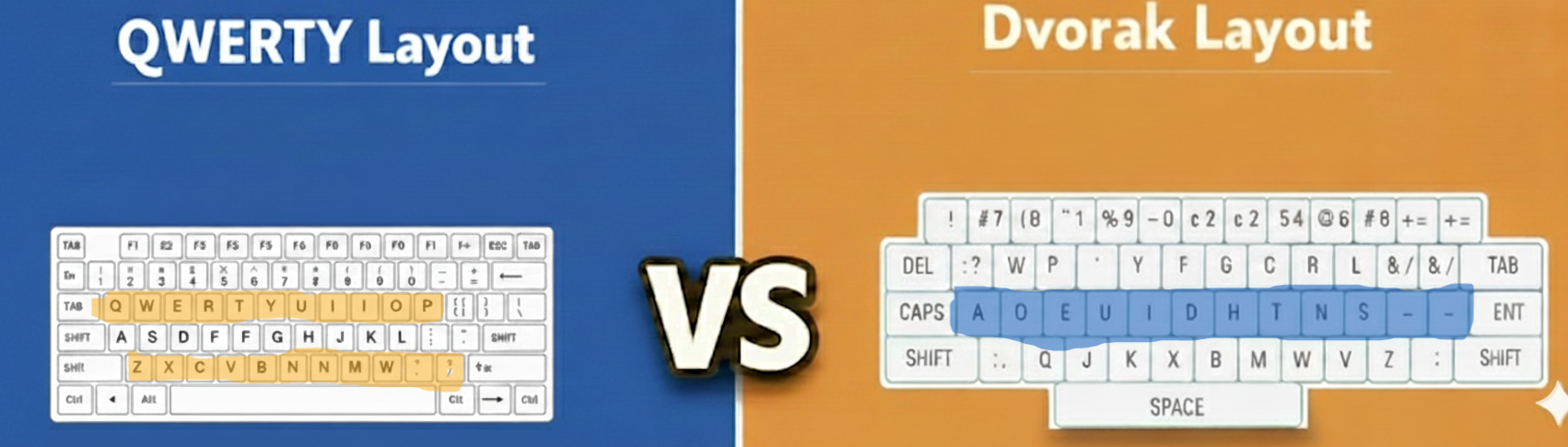
As shown above, Dvorak keeps the energy centered. While QWERTY typists are constantly reaching for the top row (52% of the time), Dvorak users stay centered on the home row.
The "Middle Ground": Colemak
If Dvorak feels too extreme, many modern typists are choosing Colemak. It only changes 17 keys from QWERTY, making it much easier to learn while still offering significantly better ergonomics.
A Warning for Mobile Users
It is important to note that Dvorak is designed for ten-finger typing. On a smartphone using two thumbs, Dvorak offers almost no speed advantage. Many find QWERTY better for mobile because the common letters are more spread out, which actually helps "autocorrect" distinguish keys.
The Verdict: Which One Should You Choose?
Stay with QWERTY if:
- You are a hardcore gamer.
- You frequently use public computers or shared laptops.
- You do 90% of your typing on a smartphone or tablet.
Switch to Dvorak if:
- You are a writer or coder typing for 6+ hours a day.
- You suffer from wrist pain or want to prevent future RSI.
- You use a Mac (utilizing the "Dvorak-QWERTY ⌘" mode).
Ready to see which layout suits you best? Try a Speed Test on Typers World and find your record today!
Frequently Asked Questions
How long does it take to learn Dvorak?
Most people reach their original QWERTY speed within 4 to 8 weeks of consistent practice. The first two weeks are the most frustrating—hang in there!
Can I use Dvorak on my iPhone or Android?
Yes! Both iOS and Android support Dvorak in the system settings. However, you likely won't see a major speed boost on mobile since the layout is optimized for full keyboards.
Do I need to buy a special Dvorak keyboard?
No. You can switch the layout in your settings. Most Dvorak users "touch type" and don't even look at the letters printed on the keys.
Will I forget how to type on QWERTY?
Surprisingly, no. Your brain treats them like two different instruments. Many users remain "bilingual" and can switch between QWERTY on a laptop and Dvorak on their home office setup effortlessly.